- Mule message object
- Mule Message
- The message header, which contains metadata about the message.
- The message payload, which contains your business-specific data.
- Mule Header
- Mule Message Payload
- Variables
- Flow variables, apply only to the flow in which they exist.
- Session variables, apply across all flows within the same application.
- Record variables, apply to only to records processed as part of a batch.
- Viewing the Mule Message
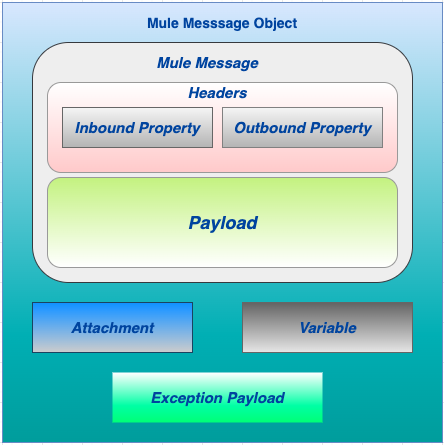
Mule message object is a object which is embedded with Mule Message, Variable, attachments, and exception payloads.
Attachments and exception payloads are not frequently used or manipulated.
A Mule message is the data that passes through an application via one or more flows.
A Mule message is the part of the Mule event that serves as a container for message content and metadata, typically from external sources, as it is processed within flows of a Mule app.
The Mule message is immutable, so every change to a Mule message results in the creation of a new instance.
Mule message can be mainly divide in two parts :-
Header contains metadata about the message.
Metadata consists of properties that provide useful information about the message.
Properties contain inbound (automatically created by message source, we cannot modify) and outbound (set by user in a flow or automatically created by Mule) properties.
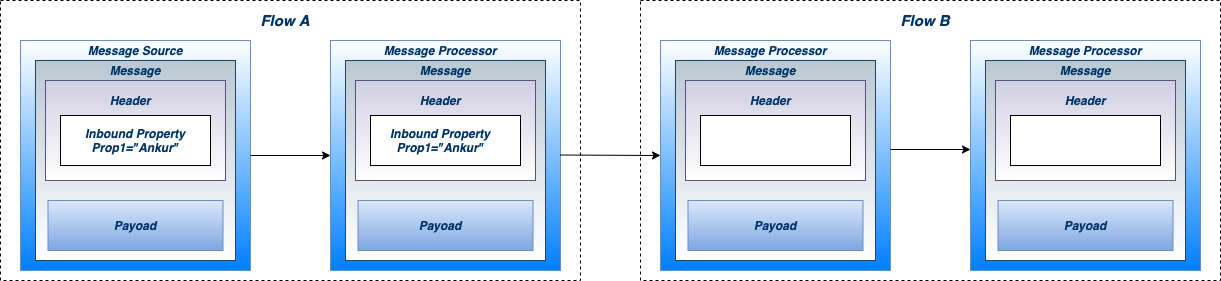
Inbound properties are immutable, are automatically generated by the message source and cannot be set or manipulated by the user.
It contain metadata specific to the message source that prevents scrambling of data formats or other processing mishaps later in the message’s lifecycle.
A message retains its inbound properties only for the duration of the flow; when a message passes out of a flow, its inbound properties do not follow it.
See the below diagram where inbound properties are flows one flow to another :-
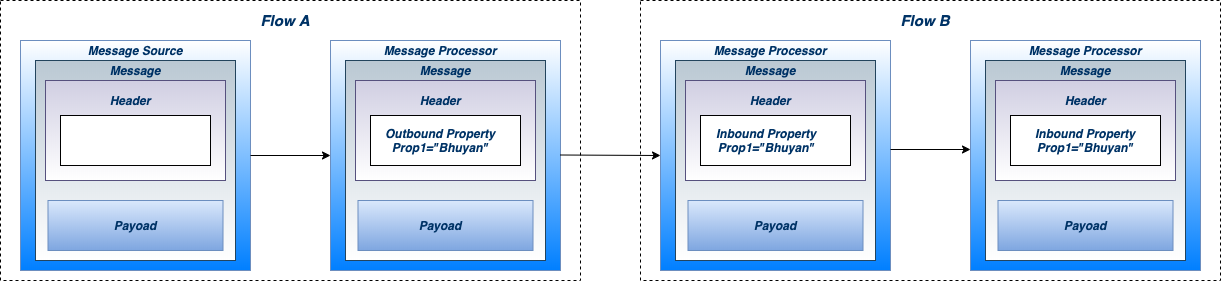
Outbound properties are mutable, they are set during the course of a flow and can become inbound properties when the message passes from the outbound endpoint of one flow to the inbound endpoint of a different flow via a transport.
They contain metadata similar to that of an inbound property, but an outbound property is applied after the message enters the flow.
Outbound properties can be set automatically by Mule or a user can set them by manually inserting one or more transformer elements in the flow.
Note that if the message is passed to a new flow via a flow-ref rather than a connector, the outbound properties remain outbound properties rather than being converted to inbound properties.
See the below diagram where outbound properties are flows one flow to another :-
The message payload is the most important part of the Mule message because it contains the data of Mule application.
The actual business message carried by message object is called payload.
The payload doesn’t necessarily stay the same as it travels through a flow. Various message processors in a Mule flow can affect the payload along the way by setting it, enriching, or transforming it into a new format.
Variables are used to store per-event values for use within a flow of a Mule app.
Variables are temporary pieces of information about a message that are meant to be used by the application that is processing it, rather than passed along with the message to its destination.
Thus, variables are more likely to be set by humans, whereas properties are more likely to be set and invoked by systems.
However, there are no strict rules about how properties and variables should be used.
Variables have three scopes:
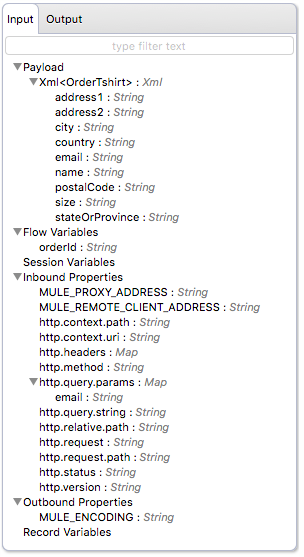
In Studio, you can visualize the structure of a Mule Message at any given point of the flow. All you have to do is select an element in the flow and click the DataSense icon.

This opens the DataSense explorer, and displays both the structure of the message that enters the element, and the structure of the message that leaves it.
Bellow diagram will give a better picture about mule message structure that looks in Anypoint studio :-
I hope you are not clear about mule 3 message structure. If so, follow me to know more about mule 3 variables.
Comments